
Customer Survey
Find out how customers feel about each delivered order. A short WhatsApp prompt collects a star rating and an optional comment, so you can spot delivery issues early and reward happy customers.
Cartsaver surfaces your live store rating at the top of the dashboard with a View link straight into the feedback list:

What it does
Section titled “What it does”Customer Survey asks every customer two questions on WhatsApp: how the purchase experience felt, and which channel brought them to the store. Responses flow into a dashboard table with the order number, phone, rating, comment, and channel — so your support team can read every comment and call back any customer who left a low rating.
The customer’s path through the survey
Section titled “The customer’s path through the survey”Customers launch the survey from the Order Received WhatsApp message itself. The Rate Experience button sits next to Order details and Contact us, so the survey is one tap away from the order confirmation they were already going to read.
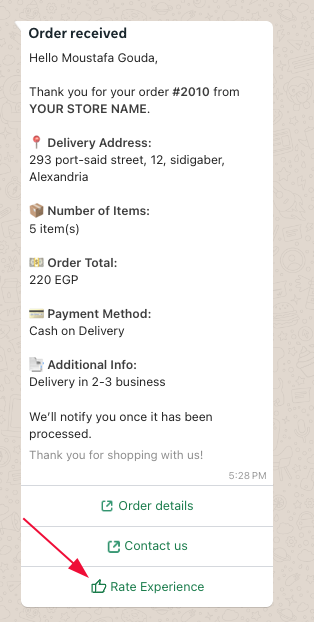
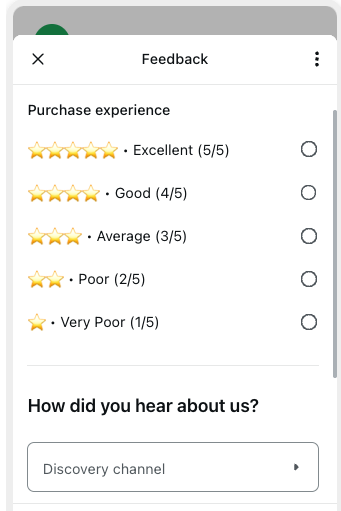
One tap on Rate Experience opens a Meta-approved WhatsApp Flow. One screen, two questions, five star buttons. No app to download, no link to follow — the customer taps a rating, picks a channel, and they’re done.
When the survey sends
Section titled “When the survey sends”The Customer Survey ships alongside Cartsaver’s Order Notifications flow. When an order moves to confirmed or fulfilled, the survey goes out as part of that same notification stream — no separate scheduling, no delay window to configure. If Order Notifications are on, the survey is on.
The two questions
Section titled “The two questions”Purchase experience rating
Section titled “Purchase experience rating”A five-point scale that maps cleanly onto a star rating:
| Customer picks | Stored as |
|---|---|
| Excellent | 5 / 5 |
| Good | 4 / 5 |
| Average | 3 / 5 |
| Poor | 2 / 5 |
| Very Poor | 1 / 5 |
The rating buttons themselves are language-neutral (stars), so the language matters mostly for the prompt copy.
How did you hear about us?
Section titled “How did you hear about us?”A discovery-channel dropdown — Facebook, Instagram, TikTok, and the rest of the usual suspects. This is the field every store owner wishes they had at checkout but never gets cleanly. Now you do: every rated customer also tells you which channel brought them in, so you know which campaigns are actually working — not which ones look good in the ad-platform dashboard.
Over a few weeks, you stop guessing where your customers come from. You see it.
See the responses in your dashboard
Section titled “See the responses in your dashboard”The dashboard chip shows your live store rating. Click View and the full Customer Survey table opens — every response, every order, every channel:
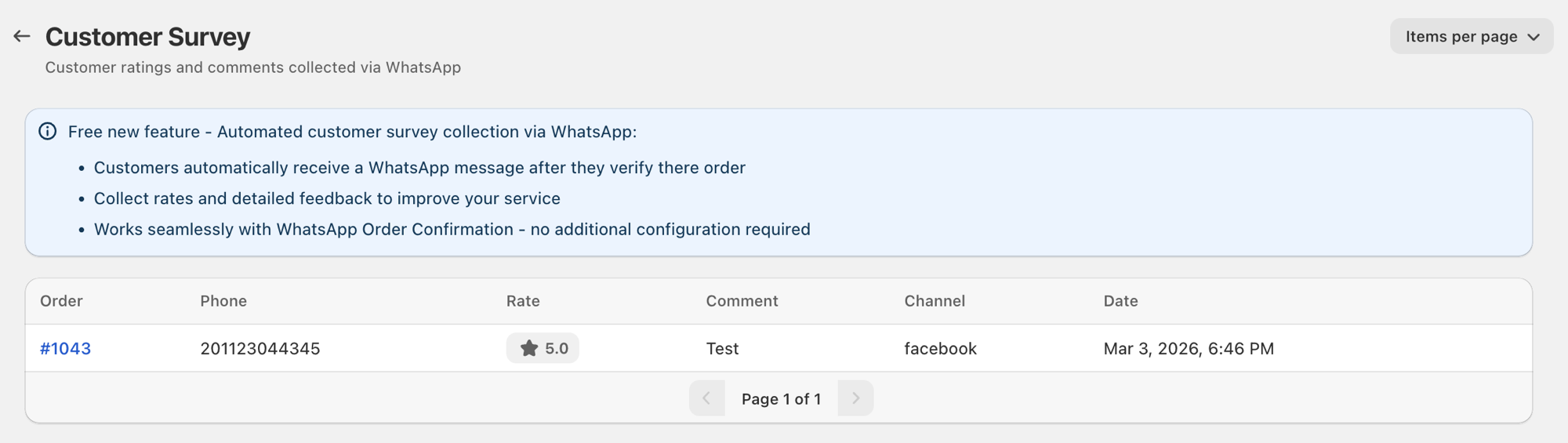
Every row shows Order, Phone, Rate, Comment, Channel, and Date — enough context to pick up the phone and have a real conversation, not just a number on a chart.
Close the loop with your customers
Section titled “Close the loop with your customers”This is where Customer Survey earns its place.
When a customer leaves a 1-star or 2-star rating, your support team has their phone number, their order number, and (if they left one) their comment — right there in the table. Pick up the phone, message them on WhatsApp, fix what went wrong.
The customers who would have quietly churned will now tell you exactly what to fix:
“I was looking for this in a different colour but couldn’t find it.”
“Your online payment didn’t work — I had to switch to COD.”
“Delivery took five days, I was told two.”
These are the conversations that don’t happen unless you make them easy. Cartsaver makes them easy.
Languages
Section titled “Languages”Surveys are sent in the customer’s checkout language — Arabic, English, Hindi, or Urdu — with a fallback to the store default. The rating buttons themselves are language-neutral (stars), so the language matters mostly for the prompt copy and the discovery-channel labels.
Pairs with
Section titled “Pairs with”- Order Notifications — the survey ships alongside this flow, so enabling notifications is enough to enable the survey too.
- Customer Reviews & Buy It Again — if you also enable reviews, the two complement each other: the survey is the short, one-tap version; the review is a longer free-text-and-photo flow that also offers a repeat-purchase cart in the same thread. Most stores enable both.