
Choose a verification channel
Cartsaver supports three channels for delivering verification codes to your customers: WhatsApp, SMS and Email. Which ones you can use depends on where verification happens:
To send from your own WhatsApp number (Scale, Ultra and Elite), see how to connect your WhatsApp Business number to Shopify. For a branded SMS sender name, see the branded SMS sender ID guide.
- Pre-checkout pop-up and Fast Checkout: SMS, Email, WhatsApp, or any combination.
- WhatsApp Order Confirmation (after the order is placed, the flow this guide sets up next): WhatsApp only.
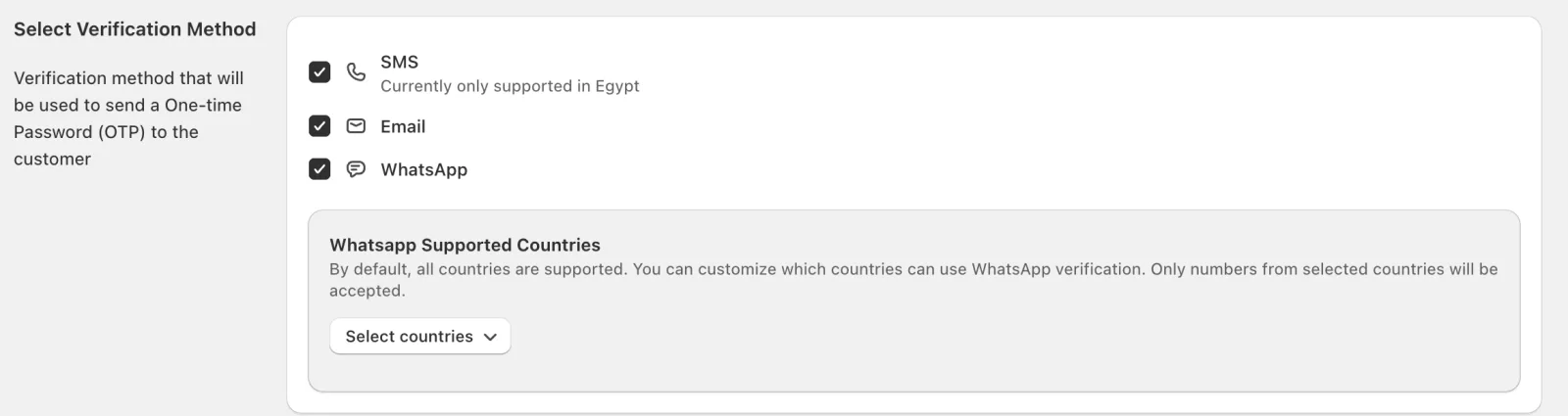
You tick the channels under Select Verification Method in Cartsaver’s Settings:
Which verification channel should you choose?
Section titled “Which verification channel should you choose?”Choose WhatsApp if most of your customers are in the Middle East and North Africa: they already use it, and the same thread then carries cross-sell offers and review requests. Add SMS for customers without WhatsApp (Egypt only through Cartsaver’s sender, other countries with your own SMS provider), or email when no phone is needed. WhatsApp Order Confirmation uses WhatsApp only.
WhatsApp: recommended for MENA stores
Section titled “WhatsApp: recommended for MENA stores”- Pros: customers already use it, and it unlocks follow-on features like cross-sell and review collection in the same thread.
- Requires: nothing extra. Cartsaver sends from its own WhatsApp Business sender, built on the official Meta API. On the Scale, Ultra and Elite plans you can connect your own WhatsApp number instead.
To use your own number, follow the steps in Connect your own WhatsApp number.
- Pros: works for any mobile number, no app required on the customer’s side.
- Availability: the app notes “Currently only supported in Egypt” for SMS sent through Cartsaver. On the Scale plan and above, you can send SMS through your own SMS provider (Set Up Your SMS Sender on the Credits card) and choose which countries’ numbers customers can enter. Mersal, Smsmisr and Cequens default to Egypt, and Jawaly defaults to Saudi Arabia.
- Pros: no phone needed; the code goes to the customer’s email.
- Availability: pre-checkout and Fast Checkout only. It isn’t available for WhatsApp Order Confirmation.
What’s next
Section titled “What’s next”Continue to Enable verification.
Verify it works
Section titled “Verify it works”- Open Cartsaver → Settings → Global Configuration.
- Under Select Verification Method, the channels you want are selected. With WhatsApp Order Confirmation, only WhatsApp is used.