
Customer Reviews & Buy It Again on WhatsApp
Fourteen days after an order ships, Cartsaver opens a WhatsApp conversation that does two jobs at once: it collects a star rating, a written comment, and a product photo — and it offers the customer a one-tap Buy It Again cart pre-loaded with what they bought before. One message, one flow. You walk away with public-ready review content for your product pages and a second order from a customer you’ve already paid to acquire.
See it in action
Section titled “See it in action”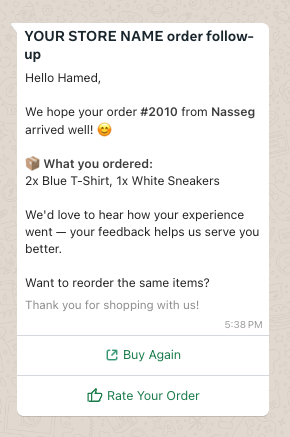
How the post-purchase follow-up works
Section titled “How the post-purchase follow-up works”Fourteen days after the order is created — once the customer has had time to actually use what they bought — Cartsaver sends a single WhatsApp follow-up message. The message greets the customer by name, lists the items they ordered, and offers two buttons in the same thread:
- Rate Your Order — opens the review flow.
- Buy Again — opens a pre-loaded Shopify cart with those exact items.
One message. One thread. Two ways forward.
The review flow
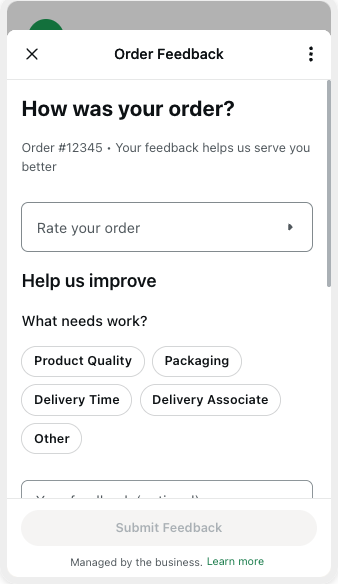
Section titled “The review flow”When the customer taps Rate Your Order, a Meta-approved WhatsApp Flow opens with these fields:
- A 1–5 star rating for the order overall.
- What needs work? — a multi-select tag picker so the customer can flag a specific issue without writing a paragraph. The options are Product Quality, Packaging, Delivery Time, Delivery Associate, and Other.
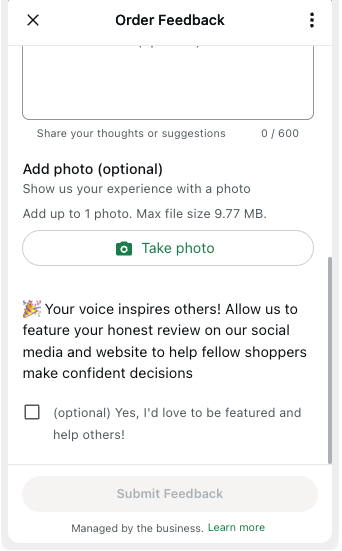
The Flow then opens a second screen for the free-text comment, the photo, and the publish-consent toggle:
- A free-text comment field, capped at 600 characters.
- One photo slot (optional). The customer can take a photo or pick one from their gallery. Max one photo per review.
- A publish consent checkbox — the customer chooses whether their review can be featured on your social media and website. If they uncheck it, the review still reaches you in the dashboard, but Cartsaver won’t surface it publicly.
When the customer submits, the review lands in your Cartsaver dashboard — rating, comment, tags, photo, and consent state recorded together.
Photo storage and sanitization
Section titled “Photo storage and sanitization”Every uploaded image is sanitized before storage. Cartsaver re-encodes the file, stripping hidden EXIF metadata and anything unsafe, caps dimensions at 4096×4096 and resizes anything larger down to 2048 pixels on the longest edge, and accepts only JPEG, PNG, or WebP.
Sanitized images upload into your Shopify Files library under a dedicated Customer Stories folder — ready to drop onto product pages or into ad creative once you’ve reviewed them. Product-page content you didn’t have to shoot.
Buy It Again — the built-in repeat-purchase button
Section titled “Buy It Again — the built-in repeat-purchase button”You paid for that customer once. This is how you stop paying for them again. Every shipped order gets one well-timed WhatsApp follow-up that can return as a repeat purchase — same products, pre-filled address, one tap to checkout — or pull the customer back to browse the rest of your catalog.
What the button sends
Section titled “What the button sends”When the customer taps Buy Again, Cartsaver builds a Shopify cart URL pre-loaded with the exact line items from the original order — the same variants, the same quantities. The cart also pre-fills the customer’s shipping address and email, so checkout is one tap.
If the customer wants something else this time, the same link drops them on your storefront with a working session — a clean re-entry point to browse the rest of your catalog.
Where the Buy It Again button appears
Section titled “Where the Buy It Again button appears”The button surfaces in two places:
- On the post-purchase follow-up message itself (shown at the top of this page), next to Rate Your Order.
- Inside an Order Inquiry reply, alongside Track and Invoice — so a customer who messages your WhatsApp about a past order can reorder it from the same reply.
The button is only shown when the order has variants and was not cancelled.
Conversion tagging
Section titled “Conversion tagging”Orders that originate from a Buy It Again cart are auto-tagged in Shopify with a Cartsaver tag — so you can filter, audit, and attribute repeat revenue cleanly in your Shopify Orders view.
Languages
Section titled “Languages”Every part of this flow — the follow-up message, the review Flow fields, the Buy It Again button copy — is sent in the customer’s checkout language (Arabic, English, Hindi, or Urdu) with a fallback to your store’s default.
Pairs with
Section titled “Pairs with”- Order Inquiry — the Buy It Again button also surfaces inside Order Inquiry replies alongside Track and Invoice.
- Customer Survey — the one-tap purchase-experience version of feedback collection. Survey is for an at-a-glance store rating; this is the deeper product-review-with- photo flow. Post-purchase trigger timing for both is set in Configuration → Customer Survey.
- Cross-sell on WhatsApp — cross-sell is for different products; Buy It Again is for the same products the customer already bought.