
Cart Recovery
Win back shoppers who didn’t finish checkout with timed WhatsApp reminders.
For why WhatsApp works for COD abandoned carts and how to judge the results, read Shopify abandoned cart recovery on WhatsApp.
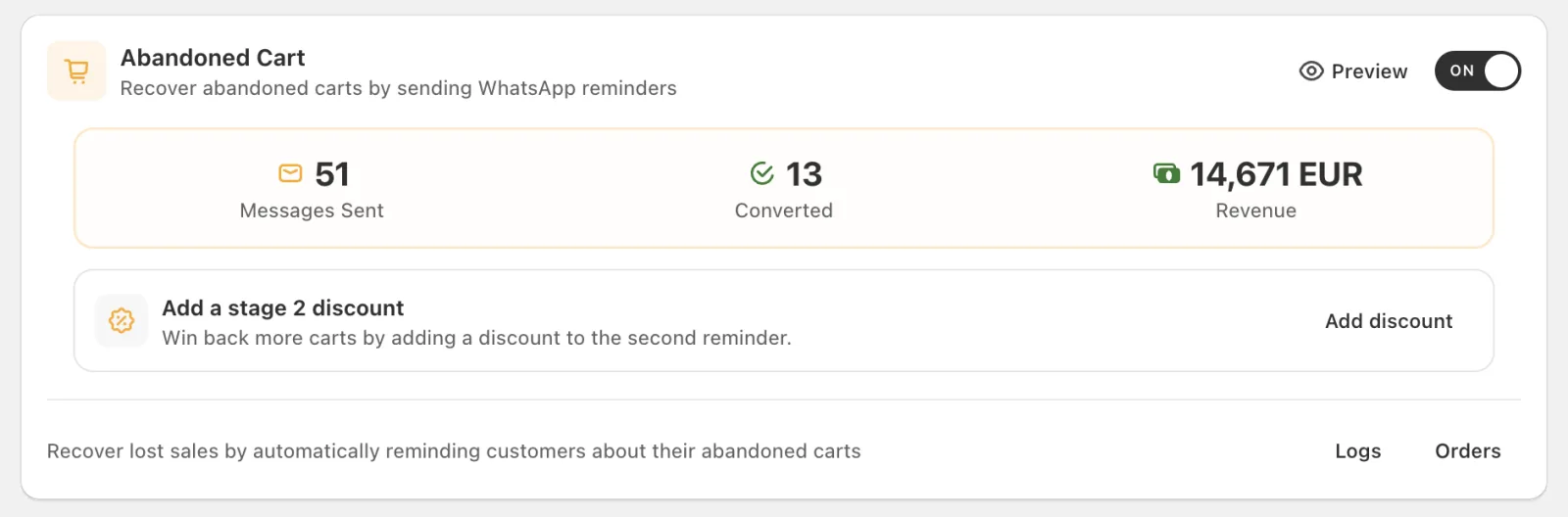
Cartsaver surfaces the Abandoned Cart performance as live counters for Messages Sent, Converted orders, and Revenue. The figures below come from Cartsaver’s own test store:
Which channel does Cart Recovery use?
Section titled “Which channel does Cart Recovery use?”Cart Recovery sends exclusively on WhatsApp. There is no SMS path in this flow and no automatic SMS fallback, so the reminders reach only shoppers whose phone number can receive WhatsApp messages. Each reminder sent from Cartsaver’s sender uses one message credit, and a failed send doesn’t use a credit.
How does Cartsaver capture abandoned carts?
Section titled “How does Cartsaver capture abandoned carts?”When a customer fills in checkout details but leaves before paying, Shopify records an Abandoned Checkout event. Cartsaver picks it up in real time and starts the recovery sequence, as long as Cart Recovery is enabled in your Cartsaver dashboard. The sequence then runs without any manual step from you.
The two-stage recovery sequence
Section titled “The two-stage recovery sequence”Cartsaver sends up to two reminders per abandoned checkout:
| Stage | Default delay after abandonment |
|---|---|
| Stage 1 | Cartsaver sends the first nudge about 1 hour after the cart is abandoned: long enough to rule out a quick pause, short enough to catch real intent. |
| Stage 2 | Sent a few hours after the items message, only to customers who engaged with Stage 1 (for example by tapping View my items) in the last 23 hours and haven’t ordered. This is the message that carries your Stage 2 discount, if you set one. |
Stage 1, soft inquiry: “Did you face any issue during checkout?” gives the customer a chance to flag a problem before assuming abandonment, with the saved item shown inline and two clear next steps.

Stage 2, urgency: a short reminder that the customer’s items are still waiting and that they should complete the order now, with a direct Complete Order button that drops them back into checkout.

Each stage links the customer back to their saved checkout via a short checkout URL. Customers who never engaged with Stage 1 don’t get a second message.
The timing is fixed by the platform: today about 1 hour after abandonment for Stage 1, and about 7 hours after the items message for Stage 2. You don’t configure delays per message.
Engaged retry
Section titled “Engaged retry”If a customer engaged with Stage 1 but never received the items message (it failed to send, or they tapped Contact support), Cartsaver sends the items message about an hour later. It is not an extra nudge.
Quiet hours
Section titled “Quiet hours”Stage 2 reminders are not sent between 1am and 9am in the customer’s local time. Cartsaver works out the customer’s time zone from the country of their phone number, not from your store’s time zone.
Languages
Section titled “Languages”Recovery messages are sent in English or Arabic, following the SMS / WhatsApp Language setting: Based on user language (the customer’s checkout language), English or Arabic.
When does a cart count as recovered?
Section titled “When does a cart count as recovered?”An order counts as recovered when the customer places it within 7 days of the last abandoned-cart message. The window is fixed and you can’t change it. Recovered orders feed the Converted and Revenue counters on the Abandoned Cart card, next to the number of messages sent.
Plan limits
Section titled “Plan limits”Each plan includes a number of recovered carts per billing cycle: 10 on Free, 20 on Advanced and 40 on Unlimited. When you reach the limit, recovery messages stop until the next billing cycle. The Scale, Ultra and Elite plans have no limit. See billing and quota for how the abandoned cart recoveries are counted.
Where to configure it
Section titled “Where to configure it”See Abandoned cart rules.