
Order Notifications
Keep your customer informed at every step — order confirmed, shipped, delivered, cancelled — with automated WhatsApp and SMS messages you can edit to match your brand voice.
Cartsaver groups Order Notifications under a single master switch, with per-event tags for each milestone the customer will be messaged about:
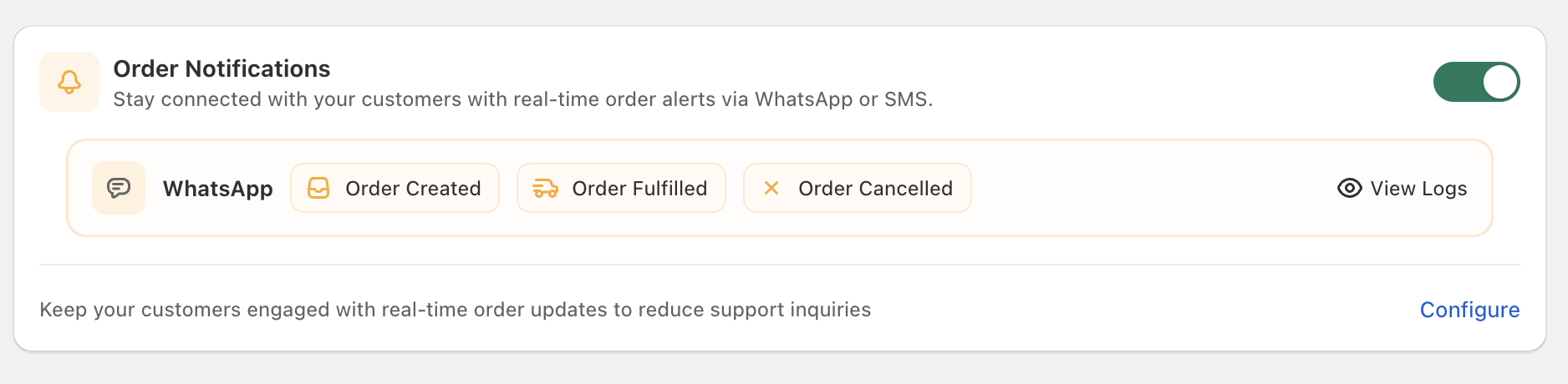
Supported events
Section titled “Supported events”Cartsaver subscribes to three Shopify order lifecycle events:
| Event | When it sends |
|---|---|
| Order confirmed | When a customer confirms the order on WhatsApp. |
| Order fulfilled | When Shopify marks the order fulfilled — typically the moment your carrier picks it up. |
| Order cancelled | When the order is cancelled in Shopify. |
Cartsaver does not subscribe to a “delivered” event because Shopify itself doesn’t emit one — fulfilled (shipped) is the latest lifecycle event available from Shopify webhooks.
Editable templates
Section titled “Editable templates”Each of the three events maps to a Meta-approved WhatsApp template that you can edit from your Cartsaver dashboard. The template body uses positional parameters (filled in by Cartsaver with the customer name, order number, tracking link, and store name) rather than free-form merge fields — changes you make are sent back to Meta for re-approval.
Additional info — a shared template
Section titled “Additional info — a shared template”The Additional info template you configure for WhatsApp Order Confirmation is also appended to every Order Notification message. Use it for support hours, delivery ETA, or a short thank-you — anything that turns a transactional notification into a small relationship moment with your customer. Edit it once in Order Confirmation and the same copy flows through Order Created, Order Fulfilled, and Order Cancelled.
Channel — WhatsApp or SMS
Section titled “Channel — WhatsApp or SMS”Order Notifications can be delivered on WhatsApp or SMS.
The channel setting is store-wide, not per-event — switching from WhatsApp to SMS affects all three notification events at once.
Real-time delivery
Section titled “Real-time delivery”Cartsaver listens to Shopify in real time. The moment Shopify marks an order created, fulfilled, or cancelled, the matching message goes out on its own — no manual action required.
Multi-language
Section titled “Multi-language”Every notification is sent in the customer’s checkout language — Arabic, English, Hindi, or Urdu — with a fallback to your store’s default. Cartsaver picks the right variant automatically.
Turning specific notifications off
Section titled “Turning specific notifications off”Any of the three events can be disabled independently if it doesn’t fit your store — for example, digital-goods stores often disable the “Order fulfilled” notification.
Pairs with cross-sell
Section titled “Pairs with cross-sell”Enable Cross-sell on WhatsApp and product recommendations arrive shortly after the order-confirmation message — customers see suggestions in the same WhatsApp thread they already trust.
The Customer Survey ships alongside Order Notifications too — once the order is marked delivered, Cartsaver sends a one-tap rating prompt on WhatsApp without you doing anything extra.
Configure it
Section titled “Configure it”See WhatsApp Order Confirmation for confirmation-message settings, and Languages & translations to edit the wording.